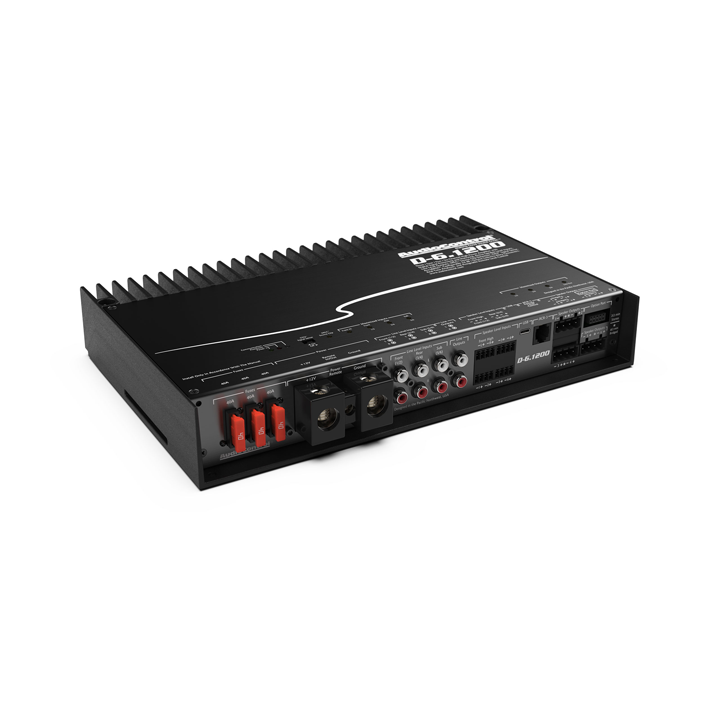

A clean, powerful car audio system doesn’t start with expensive speakers or a massive amplifier—it begins with a properly set gain. When gain is misadjusted, even the best equipment struggles. Harsh vocals, muddy bass, and unexpected distortion often trace back to this single setting. A correct gain adjustment allows the amplifier to deliver its full potential without pushing speakers into damage or clipping territory.
Many drivers confuse gain with volume, but the two behave very differently. Volume controls how loud the music plays, while gain determines the strength of the input signal going into the amplifier. If gain is set too high, the amp forces out a clipped, distorted signal that overheats voice coils and destroys speakers over time. Too low, and the system sounds weak and lacks clarity. Finding the perfect balance is essential for safe amp settings and long-term performance.
Understanding What Gain Really Does
Before adjusting anything, it helps to understand why the gain knob exists. The amplifier receives a signal from the head unit or DSP. That signal varies depending on the device, wiring, and voltage output. Gain allows the amplifier to match its sensitivity to that input signal so the output remains clean.
Correct gain setting ensures:
-
Clear midrange and treble
-
Bass that hits without breaking apart
-
Less stress on speakers
-
Maximum dynamic range without distortion
-
Stable temperature across amplifier channels
This step forms the backbone of protecting car speakers from long-term wear.
Signs Your Gain Is Not Set Correctly
Recognizing early warning signs helps prevent damage. If your system feels harsh at moderate volume, that’s often the first clue.

1. Distortion Appearing Too Early
If vocals crackle or bass sounds fuzzy long before the system reaches high volume, the gain is likely set too high. The amplifier is clipping, and the speakers are receiving incomplete waveforms.
2. Weak Output Even at High Volume
If your volume is turned up but the system still feels underpowered, the gain may be too low. The amp simply isn’t amplifying the incoming signal strongly enough.
3. Overheating Amplifier
Heat is a major byproduct of incorrect gain. When the amp is pushed beyond its limits, the internal components work harder, increasing temperature. Persistent overheating is a major red flag.
4. Bass “Bottoming Out”
Subwoofers with improper gain often struggle to reproduce low frequencies, producing thumps, pops, or mechanical noise.
These symptoms serve as early indicators that your amplifier gain setting needs attention.
Tools You Can Use for Accurate Gain Adjustment
While you can adjust gain by ear, certain tools make the process more precise and safe.
-
Digital Multimeter (DMM) – Measures voltage output to match RMS values.
-
Test Tones – Usually 40Hz for subs, 1kHz for mids/highs.
-
Oscilloscope – Ideal for professional-level waveform monitoring.
-
Distortion Detectors – Devices like SMD DD-1 identify clipping instantly.
Not all tools are required, but having at least one improves accuracy and protects your equipment.
Step-by-Step Gain Adjustment Guide
This process gives you a clean baseline, allowing the amplifier and speakers to work together without stress.
1. Start by Setting All EQ to Flat
Bass boost, loudness controls, and EQ adjustments should be turned off or set to neutral. These features change the signal strength, making gain harder to calibrate accurately.
2. Set Head Unit Volume to Its Clean Max
Most head units clip before reaching full volume. The goal is to find the highest clean output point.
Typical safe range:
-
Factory radio: 70–80%
-
Aftermarket radio: 80–90%
This ensures the amplifier receives a strong, clean signal.
3. Turn the Amplifier Gain All the Way Down
Starting from zero gives full control over the adjustment. Keep the amp’s bass boost at zero as well.
4. Play the Appropriate Test Tone
Use:
-
40Hz tone for subwoofer channels
-
1kHz tone for full-range or mids/highs
This isolates the frequency range handled by each amplifier channel.
5. Slowly Increase Gain Until You Hear (or Detect) Distortion
Raise the gain gradually.
If you hear buzzing, crackling, or harsh edges:
You’ve hit distortion—back the gain down slightly.
If using a meter or device:
Match the voltage to the amplifier’s RMS rating using:
Voltage = √(Watts × Ohms)
This method ensures precision and avoids accidental overpowering.
6. Re-enable EQ and Fine Tune
Once gain is set, you can restore bass, treble, or DSP adjustments. Because the foundation is now clean, these enhancements won’t push the amplifier into clipping.
Common Mistakes to Avoid During Gain Setting
1. Treating Gain Like a Volume Booster
Turning the gain past its proper point doesn’t improve loudness—it only increases distortion. The volume knob is your loudness control, not the gain dial.
2. Leaving Bass Boost On During Calibration
Bass boost raises signal voltage dramatically. If used during gain adjustment, it forces clipping long before the signal reaches the amplifier’s rated power.
3. Using Unbalanced or Poor Quality RCA Cables
Weak signal transfer leads to incorrect gain settings. Better cables reduce noise and provide stable input strength.
4. Ignoring Speaker Wattage Limits
Speakers must match the amplifier’s RMS power. Even the best gain settings can’t save speakers from excessive wattage exposure.
Avoiding these mistakes preserves speaker longevity and system stability.
How Proper Gain Settings Protect Your Speakers

A clean system runs cooler, lasts longer, and performs consistently.
Correct gain prevents:
-
Overheating voice coils
-
Cone flexing and mechanical damage
-
Tweeter burn-out
-
Subwoofer bottoming
-
Sudden distortion at high volume
By creating a balanced input-to-output chain, gain calibration ensures your speakers operate within their design limits. This is one of the most crucial steps in protecting car speakers across every audio setup, from simple coaxials to multi-amp systems.
What to Do If You Still Hear Distortion After Gain Adjustment
If sound quality remains poor after following the gain adjustment guide, there may be another issue within the system.
Possible causes include:
-
Damaged or aging speakers
-
Undersized power wiring
-
Weak ground connection
-
Incorrect crossover settings
-
Voltage drops from the battery or alternator
-
Internal amplifier faults
Testing each link in the chain helps isolate the problem. Sometimes the fix is simple, such as tightening a ground or correcting a crossover frequency. In other cases, damaged speakers or failing amplifiers require replacement.
If replacement becomes necessary, choosing reliable components ensures cleaner output and reduces future distortion. For drivers upgrading their system, high-quality amps and speakers available at Elite Auto Gear offer a performance-focused path that pairs well with proper gain settings and long-term audio protection.